
Support
For direct support join the community on Spatial Thinking! Click here
What is Inclr?
Inclr is based on a general concept of mindmapping, but different.. Here's what's different:
Inclr is made to be deeply structured. Most mind mappers are less deep and become very complex when the structure gets larger and larger. Inclr doesn't follow a the typical mindmapping method using trees and simple ideas.
We patented a new system that allows each body of data to be deeper, multilayered and interactive. We call these "inclrs".
Quick Guide

Inclr Demo
Concept Mapping with inclrs
Editing an inclr
Using Entries
Mindmap View Mode and Drag to Add
Structure of an inclr


Each inclr contains layers, like an onion. Each layer contains nodes which is interactive by touch. New inclrs start with one layer
Inside each node are entries like web browsers, notes, photos, lists and more. You can combine them in any way you want.
Nodes are arranged clockwise starting from the right (3 o'clock position).
Spinning the nodes and layers by touch will rotate the nodes, whereby the middle display will show the current node.
The middle display is also a button where you can activate a node or a menu.
Interacting with inclrs
Finger touch - spinning the nodes
iPhone & iPads: moving your finger in a clockwise or anticlockwise direction. The middle display will show the current node at the 3 o'clock position.
Mac: use the mouse scroll wheel to rotate the nodes.
Click on a Middle Title
Click on the middle display on the inclr title or node title to display or open it.
Reorder: hold press on a node
Delete: hold press & drag to bin (bottom left)
Hold Press & drag up to Search Board
Drag to the top area to activate Search Board. It allows you to move, copy or create an instance of a node. (An instance allows you to have the same node in multiple inclrs).
Add a new node: click on plus button

Edit an inclr

Click the edit icon button at the bottom of an inclr to open the edit menu. Menu items:
Edit Inclr : edit menu for inclr
Edit Node : edit toolbar for node
Link : hyperlink for this inclr
Remind : Calendar event with inclr link
Share : by cloud link or attachment
Lock : fingerprint, passcode or FaceID
Delete
Edit Layers : edit menu for adding / deleting layers
Backup / Restore : by cloud or file
Contents : reports inclr contents
Fix Tools : for when things go wrong.
Adding Entries

Click Plus button
To add a new entry to node. Nodes can contain unlimited entries.
The entry's Content Chooser allows you to select what content this entry will contain.
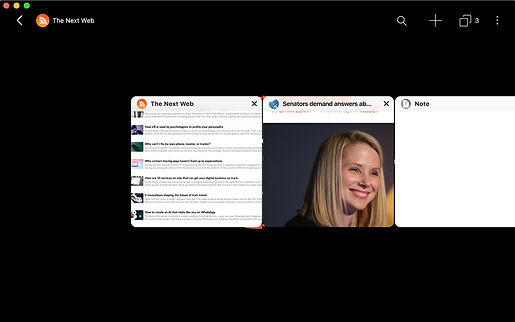
You can mix and match all kinds of content inside each node.

Delete: Hold press & drag bottom left
Hold Press & drag up to Search Board
Drag to the top area to activate Search Board to move, copy or instance an entry.
Reorder: Hold press and drag left or right.
View Modes
View modes allow you to see your inclr in different ways. There are currently 7 View Modes:


List


Mindmap


Concept Map


World


Augmented Reality (AR)
and 3D
FAQ
How Private is Inclr?
We are a small company aiming to help change the world. We aren’t interested in selling your data. Your data is completely owned by you offline and online in iCloud. Inclr uses Apple ID to sign into iCloud. It’s secure. In fact we can’t even access you iCloud email.
About the Trial
Once the trial expires, you will be automatically subscribed via Apple In-App Purchase.. This is setting is part of the App Store policy for Trials. You can cancel anytime before the trial finishes in the Apple Subscription settings.
About Payment
The Monthly and Yearly payment are auto-renew subscriptions. The One-Time Payment is a one-off purchase*. The purchase is universal across iPhone, iPad and Mac Inclrs.
Is Inclr actively being developed?
Absolutely! We’re here to stay. We are actively improving everything in Inclr, including this website! We are only around 30% of the way to where Inclr should be in the near future.
Will Inclr ever shut down?
Inclr will never shut down. Inclr is a long term project constantly evolving. We’re serious enough to patent Inclr, an expensive and lengthy process!
Inclr seems buggy and rough around the edges.
Inclr is always innovating and progressing. We are also a small team. Inclr is also quite complex, handling many different kinds of frameworks and unifying everything into one user experience. For this reason, there will be minor bugs along the way. However, support is normally quick and resolved with an app update within a week or so.
Inclr is different to normal mindmappers?
We believe mindmapping should be a general concept involving a visual method to map the mind. Inclr is made for creating a second brain, rather than brainstorming like most mind mappers. That said, we are also actively importing normal mindmap features into Inclr.
When was Inclr invented?
November 2015.
Patented on 7th January 2016 in Hong Kong.
Patent Pending in US, UK and China.
Does Inclr export to other mind mappers?
Inclr doesn't current export to other mind mappers outside of standard formats. Inclr exports screenshots and Entries as html, text and images. It also shares inclrs and backups as a zip file of its database and assets.
Where is Inclr being developed?
Sydney Australia.
Inclr Limited remains in Hong Kong.
I love Inclr but there's features missing.
Write to us! We are always happy to implement a feature request. If it’s simple, it can be done in a week! Inclr is constantly improving.
How do you pronounce Inclr?
In-cler
How was the name derived?
-
Information Cluster
-
Inclusive
-
Inclosure
-
In-Circles
-
Inkling
Is Ken really an architect?
Yep. His passion is designing buildings you have never seen before. With Inclr he's found his life mission to design space with data and emotions and to innovate on every level in an attempt to bring forth a cyberspace that has been designed for us, not for a search engine.